I Revived My Broken MacBook Into My Own Personal Cloud
As a tech enthusiast, I have a habit of accumulating "retired" hardware. Over the years, several iPhones and Macs have ended up in drawers, collecting dust. Rather than let them keep collecting dust, I started thinking about how to get some actual use out of them.
So I wanted to build a private cloud, complete with a personal ChatGPT interface (via Open WebUI) and a private "Google Drive/Dropbox" (via OpenCloud). I wanted my data on my own hardware, under my control, rather than in an external cloud.
I looked at a 2017 MacBook Pro sitting in my drawer. The keyboard was broken, but it still ran, so I decided it would be a good machine to set up Kubernetes on.
Setting up Kubernetes
Before anything else could happen, I needed an OS on the machine. I didn't have a spare USB drive handy, so I flashed Ubuntu 24.04 Desktop onto an old Raspberry Pi SD card and used that as a stand-in installer to get Ubuntu onto the Mac. It was slow, but it worked.
The first real hurdle was the hardware itself, specifically getting the Broadcom Wi-Fi drivers working. After trying to modify the official driver source code with Claude's help, I found a script that worked: https://gist.github.com/torresashjian/e97d954c7f1554b6a017f07d69a66374. I set it up to run on every restart, so the Wi-Fi comes back up whenever the Mac boots.
Once online, I enabled SSH for remote management, restricted to my internal network. For updates, I wanted a "GitOps" workflow instead of manual changes.
With SSH reliably reachable, I deployed k3s for lightweight orchestration and connected it to Flux CD. This meant that instead of manual configuration, Flux would pull directly from my GitLab repository and automatically apply any changes to the cluster.
Unfortunately, my new server kept ignoring me whenever I closed the lid. Ofc, this was due to the computer entering sleep mode. So I modified the power settings for Ubuntu by editing /etc/systemd/logind.conf and setting HandleLidSwitch=ignore, to make sure it always kept running. No matter what.
The Network Issues
Once the core system was stable, I needed my domain to actually point at my server. I didn't want to pay my ISP for a static IP, so I wrote a small Python script that checks my public IP every 15 minutes and updates my domain's A records through an API, running as a takk job.
It didn't work though, as I wasn't aware my network was set up using CG-NAT (Carrier-Grade NAT), meaning I didn't have a public IP of my own. It was shared across a whole range of customers behind my ISP's NAT gateway. So the script was correctly updating my domain, but to an IP address that didn't actually lead back to my house.
A quick, slightly humbling phone call to my network provider solved it. Turns out they hadn't opened a single port. They'd taken me off CG-NAT and given me my own public IP, free of charge. They can still swap my IP anytime though, so I kept the script running to keep the server reachable.
I could have kept everything on my local network behind a VPN, but getting a trusted HTTPS certificate without a public endpoint isn't straightforward, and OpenCloud requires HTTPS to function properly.
To get real SSL certificates, I needed a proper public endpoint, which led me to Domene.shop, a local DNS provider with a solid API for my IP-update script and a webhook adaptor for Let's Encrypt. Once my DNS pointed to my host, the cluster could handle SSL certificates automatically.
Managing k8s Manifests
With the network and DNS stable, I started deploying the "big" services, OpenCloud for my files and Open WebUI for my AI.
However, as I added more services, requiring Postgres databases, Redis caches, MinIO storage, and SSL certificates, the Kubernetes YAML became hard to manage. I kept mistyping service names, misconfiguring environment variables, and mismatching metadata.
This is where the project shifted from "playing with k8s" to building an easier to maintain system. To manage this complexity, I turned to takk, an infrastructure-as-code framework that I maintain.
Instead of writing hundreds of lines of brittle YAML, I define my infrastructure in Python. takk handles the heavy lifting. It generates the k8s configs, ensures all secrets and environment variables are consistent across services, and manages the relationships between third-party resources like databases and the apps that need them.
from pydantic import PostgresDsn
from pydantic_settings import BaseSettings
from takk import Project, NetworkApp
from takk.secrets import S3AccessKey, S3BucketName, S3Endpoint, S3RegionName, S3SecretKey

class OpenWebUISettings(BaseSettings):
    database_url: PostgresDsn
    s3_bucket_name: S3BucketName
    s3_region_name: S3RegionName
    s3_endpoint_url: S3Endpoint
    s3_secret_access_key: S3SecretKey
    s3_access_key: S3AccessKey
    # Currently using Scaleway for the heavy lifting,
    # but this architecture makes it trivial to point to a local LLM later.
    openai_api_base_url: str = "https://api.scaleway.ai/v1"
    openai_api_key: str = "... "

project = Project(
    name="infra",
    chat=NetworkApp(
        docker_image="ghcr.io/open-webui/open-webui:v0.8.6",
        port=8080,
        settings=[OpenWebUISettings]
    )
)
Connecting Obsidian to My AI
With the infrastructure stable, I hit the most rewarding part of the project.
I had my files in OpenCloud and my AI in Open WebUI, but they were completely separate. My chat interface could talk to me, but it couldn't see my data. I couldn't ask it, "What were my notes on the project from yesterday?"
I needed a bridge. Since there wasn't a standard way to expose OpenCloud files to an LLM, I built one using FastAPI, reading the files straight out of OpenCloud over WebDAV. I created a custom toolset that exposed my Obsidian paths, tags, and backlinks via an API.
That wasn't quite enough on its own. Open WebUI's default function calling mode has the model pick its tool calls upfront and run with them, without looking at what comes back. I switched it to Native mode instead, which lets the model reason about each tool's output before deciding what to do next, so it can look at a result and decide that output means it should call another tool.
With that in place, I could ask my self-hosted AI things like:
Summarise my meeting notes from last week, and if needed create any todos for this week.
Since my infrastructure was already defined in takk, adding this new FastAPI "bridge" just meant adding it to my Project config, and the cluster handled the rest. I even extended this to Neovim, allowing me to get inline AI completions in my terminal that could "read" my Obsidian files.
project = Project(
    # ... existing config
    obsidian_tools=FastAPIApp(
        app="src.takk_k8s.obsidian_tools:app",
        settings=[ObsidianToolsSettings],
        compute=Compute(mvcpu_limit=250, mb_memory_limit=256)
    )
)
Monitoring
Once the AI could access my notes, I had no way of knowing if a service went down, and I didn't want to find out my cluster was broken right when I needed a file.
I added two separate things here. A Prometheus MCP (Model Context Protocol) server lets me ask my cluster questions directly, while Alerting is handled by takk itself, generating the alerting rules and notification routing I need. The alerting part is defined directly in my takk Project config, so if a service enters a crash loop or a job fails, I get an email immediately. Everything, from the network to the alerts, is defined in code.
project = Project(
    # ... existing config
    alerts=[
        Alert(
            name="CrashLoop",
            query="increase(kube_pod_container_status_restarts_total[1h]) > 2",
            notify=[mats],
            severity="critical"
        ),
        Alert(
            name="FailingJobs",
            query="...",
            severity="critical",
            notify=[mats]
        ),
    ],
)
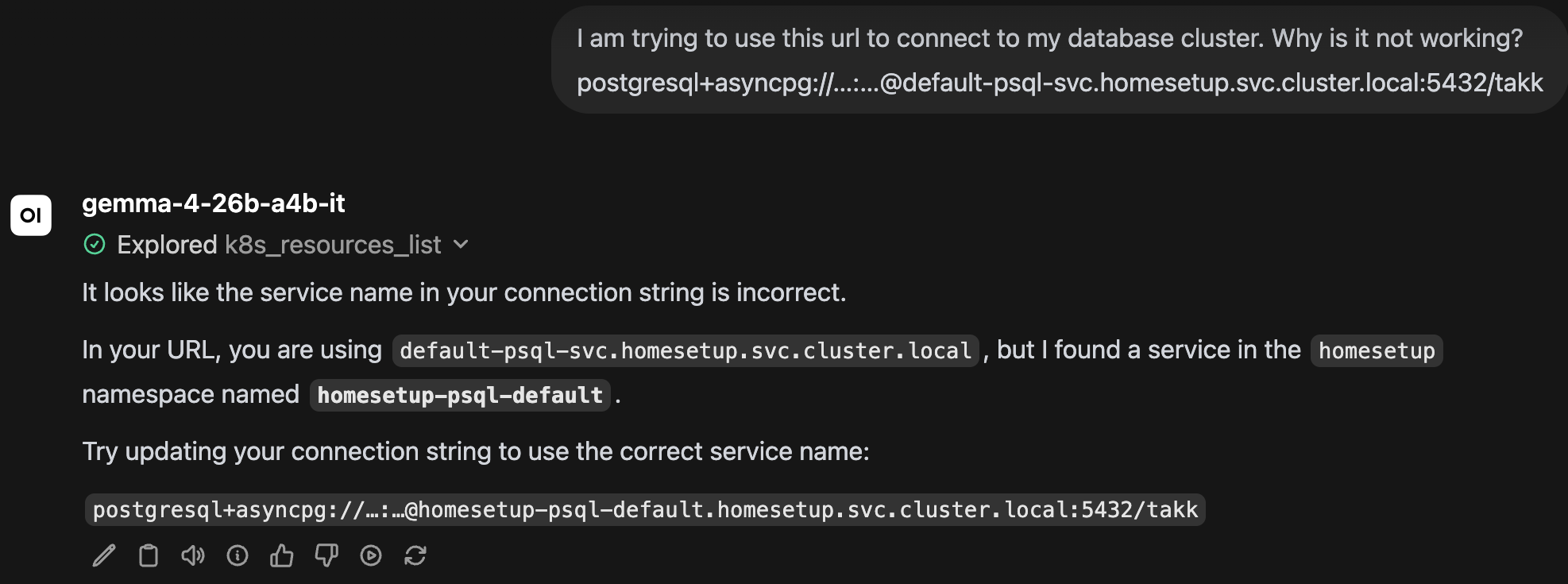
I also added a k8s MCP server, which made it much easier to debug my cluster. Instead of SSH-ing in and running kubectl, I can chat directly in Open WebUI, making it easy to debug issues such as:
why am I not able to connect to my psql database with this host url?
What's Running Today
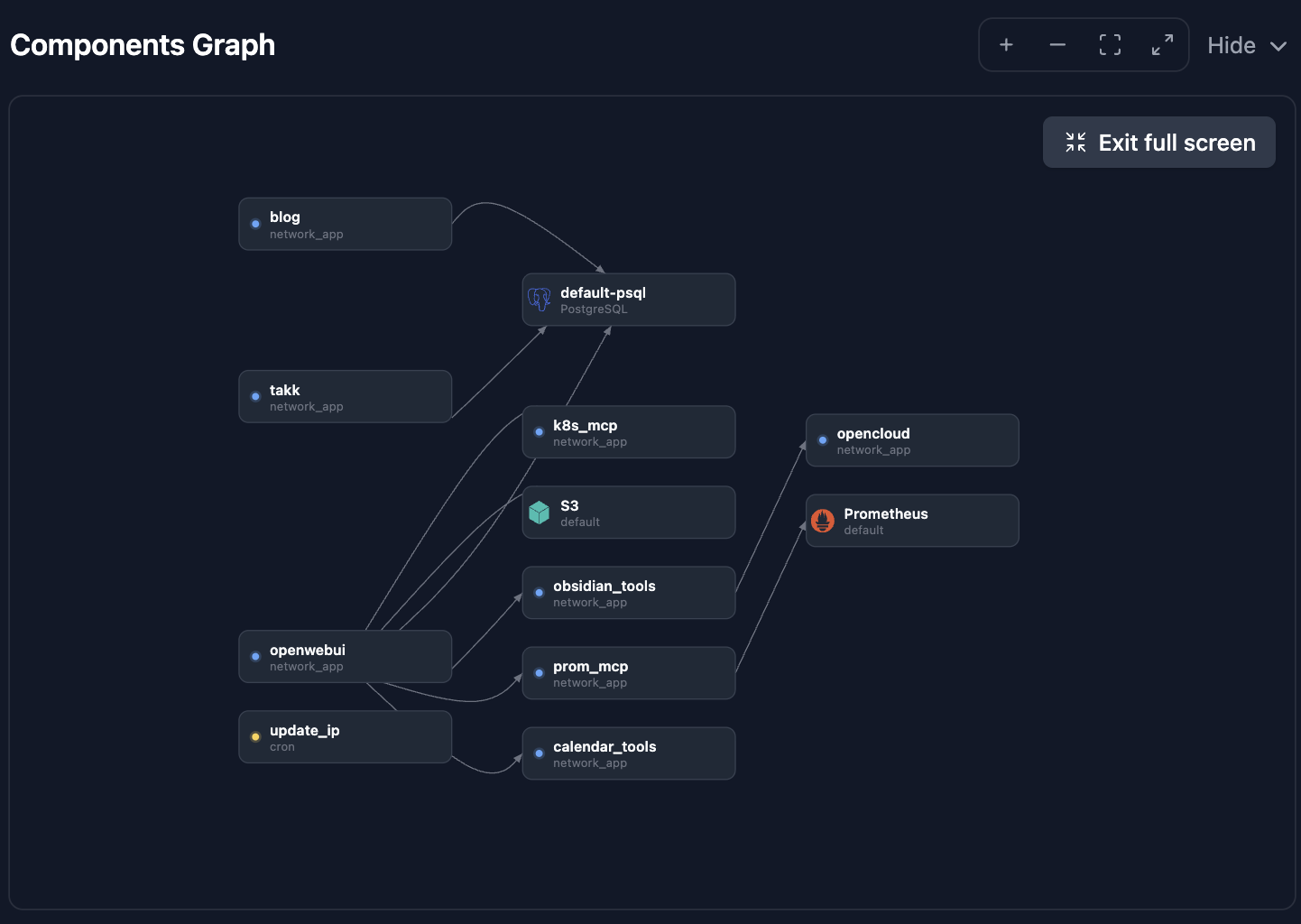
The cluster slowly grew based on whatever I needed next. There's the Obsidian bridge, but also things like calendar tools, and a few others along the way. Even this blog, the one you're reading right now, runs on it as the blog service. The graph below shows all the services and how they depend on each other, generated automatically from my takk Project config.
Network Architecture
With the network, DNS, and services all wired up, here's how everything fits together, from a request hitting my domain to the data landing back on my devices.
Future Updates
What started as clearing out a desk drawer turned into a fully functioning private cloud. I own my data, and I own the code that runs it all.
A few things I'm planning next:
- •Local LLM: Setting up a dedicated machine for fully private LLMs (Gemma 4, etc.), and only offload to Scaleway when I need the extra performance.
- •Self-Healing: Integrating a coding agent that can monitor the logs and suggest (or apply) fixes to the cluster itself.
- •Hardened Backups: Moving from "syncing" to a professional backup strategy using tools like Velero.
If you've done something similar with old hardware, or have suggestions for what to tackle next, let me know in the comments.